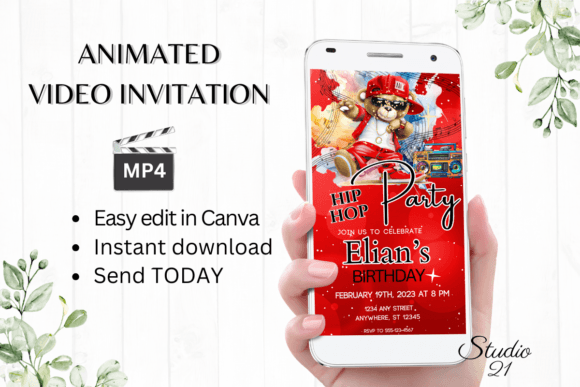
Digital Hip Hop Birthday Party Invite: A Designer's Breakdown
Unpacking the Vibe: More Than Just an Invitation
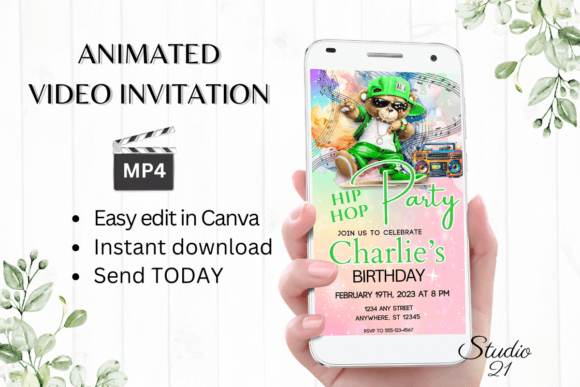
Let's be honest, most digital invitations feel like afterthoughts—a quick Canva template with a generic balloon graphic and a font you've seen a thousand times. The Digital Hip Hop Birthday Party Invite template operates on a completely different frequency. This isn't just a static image with text; it's an animated video invitation designed to capture the raw energy and urban cool of hip hop culture. Think bold, graphic elements, dynamic motion, and a typographic voice that commands attention. The visual style leans into street art aesthetics, with grunge textures, neon accents, and a layout that feels more like a concert flyer or a streetwear brand's social post than a traditional party invite. Its personality is confident, youthful, and unapologetically bold, making it perfect for a milestone birthday that’s less about tea parties and more about turning up.
The appeal lies in its specificity. While a minimalist sans serif template is versatile, it lacks a distinct point of view. This Digital Hip Hop Birthday Party Invite has a strong, pre-defined character. That character is its greatest asset for the right event. It immediately sets expectations for your guests: this party will have a great soundtrack, a killer vibe, and an host who pays attention to style. For designers and content creators, it’s a case study in how a premium font choice and animation style can build an entire narrative before a single word is read. The template uses typography not just as information, but as the central design element—proof that the right typeface is foundational to effective brand identity.
Practical Applications: Where This Template Shines
Understanding where a template like the Digital Hip Hop Birthday Party Invite works best is about matching its energy to the context. Its core application is obvious: a hip hop-themed birthday bash, a 90s nostalgia party, or any celebration where the guest list appreciates urban culture, streetwear, or contemporary music. The animated MP4 format is ideal for sharing on platforms where motion catches the eye—think Instagram Stories, TikTok, or a direct message in a group chat. The 1080x1920 pixel dimension is perfectly optimized for vertical mobile viewing, which is where 90% of your guests will first see it.
Beyond personal parties, the template's design language has broader utility. A creative font with this much personality can be adapted for:
- Event Marketing: Promoting a club night, a DJ set, a pop-up shop for a streetwear brand, or a community block party. The animated style grabs attention in a crowded social media feed.
- Brand Collateral for Niche Businesses: A record store, an urban apparel brand, or a sneaker boutique could use a modified version of this style for email headers, sale announcements, or loyalty program invites to create cohesive, audience-specific communications.
- Social Media Content: The bold typography and animation can be deconstructed. A marketer could extract the font style and motion principles to create Instagram Reels or TikTok content that feels consistent with the hip hop aesthetic, building visual hierarchy and audience engagement.
- Personal Branding for Creatives: For a content creator, music producer, or urban photographer, elements from this template could inspire a portfolio website header or a promotional video intro, establishing a strong, recognizable brand identity.
The key is evaluating project fit. This isn't the template for a formal gala or a baby shower. Its strength is in its niche. Before committing, ask: does the personality of my event or brand align with this bold, animated, hip hop-inspired style? If the answer is a confident yes, it becomes a powerful design asset that does most of the heavy lifting for you.
Working With the Template: A Hands-On Guide
One of the template's most significant advantages is its accessibility. The promise of "no software or fonts to download" is a huge practical win. You receive a PDF with a direct link that opens the project in Canva's free editor. This eliminates the technical barrier of managing font licenses or installing new software, making it perfect for the hobbyist or small business owner who needs a professional result without a professional workflow. The user guide is crucial—take ten minutes to read it. It will walk you through Canva's interface, explaining how to change the font style, color & size, modify the animation styles, and ultimately download your finished MP4 file.
When personalizing, think like a designer. The template likely uses a display font—a typeface designed for impact at large sizes, like headlines. This is not your body copy font. Its job is to shout the party details. Use the editing tools to ensure readability. If the original color clashes with your chosen background, change it. If the animation is too frantic, see if there's a slower option. You’re not just filling in blanks; you’re directing the final piece. Test your edits on your phone. Since it will be viewed on mobile, check that the text is legible on a small screen and that the animation plays smoothly.
Consider the sharing strategy. The template allows you to download the MP4 for direct sharing or generate a Canva link for email. For maximum impact, think about your audience's habits. A video file sent via iMessage or WhatsApp feels immediate and personal. A link sent via email is better for a larger, more formal guest list where you might include additional details. The flexibility is a major strength. Remember, you can always go back and edit the template later if plans change—a luxury you don’t have with a printed invite. This digital download model is about efficiency and control, putting the power of a polished, animated invitation directly in your hands within minutes.