Instant Karaoke Party Invitations: Your Digital Template Guide
Planning a karaoke night involves a lot of moving parts—booking the venue, setting up the sound system, and curating the ultimate playlist. The one thing that shouldn’t take up your entire afternoon is the invitation. If you’ve been staring at a blank canvas, trying to muster the energy to design a graphic from scratch, it’s time to change your workflow. A digital animated video invitation template is the most efficient way to get the word out, look professional, and actually enjoy the process. This isn't just about sending a text message; it’s about setting the tone for the event immediately.
The "No-Software" Advantage: Why Canva Changes Everything
For years, high-quality video invitations required expensive software like After Effects or Premiere Pro. That barrier to entry is gone. By utilizing a template hosted directly in Canva, you bypass the technical headaches entirely. There is no software to install, no fonts to download manually, and no compatibility issues to troubleshoot. You simply click the link provided in your PDF download, and you are instantly transported to the editor.
This approach is invaluable for busy entrepreneurs and event planners. Whether you are a small business owner hosting a team-building event or a content creator organizing a meet-up, time is your most valuable asset. The "edit and send within minutes" promise isn't marketing fluff; it’s a reality of the modern design workflow. You can make basic edits from your mobile device while commuting, or fine-tune the details on your desktop computer. The immediate access means you don’t have to wait for proofs from a designer. You have total control over the timeline.
Designing for Vibe: Visual Style and Animation
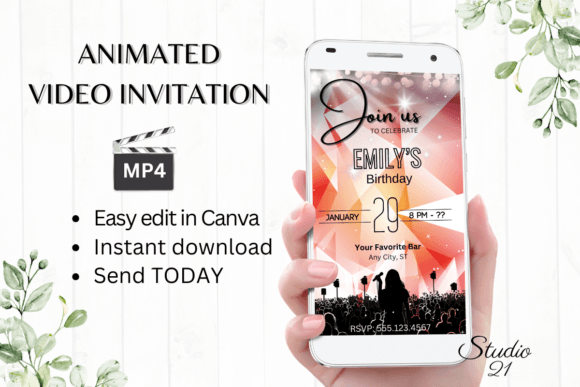
A karaoke party isn't a board meeting. The visual personality of your invitation needs to reflect the energy of the event—fun, loud, colorful, and slightly chaotic. A static image often fails to capture this motion. An animated video template, however, can utilize movement to simulate the excitement of a spotlight turning on or microphone feedback.
When you open the template, look at the visual characteristics provided. Good templates use modern typography that balances legibility with flair. You might see a mix of a bold display font for the headlines to grab attention, paired with a clean sans serif font for the details like time and location. This combination ensures that the "vibe" is established immediately, but the critical information isn't lost in the noise.
The animation styles included in these templates are designed to guide the viewer's eye. In digital design, movement creates hierarchy. If the text "You're Invited" slides onto the screen first, followed by the date, the viewer processes the information in the order you intended. This is a subtle but powerful way to influence readability and ensure your message lands effectively.
Personalization and Brand Consistency
While this is a party invitation, for many of you reading this, it is also a representation of your personal or corporate brand. If you are a small business owner or a marketer, consistency is key. The ability to change font styles, colors, and sizes is not just a feature; it is a necessity for maintaining your brand identity.
Imagine you are hosting a corporate mixer with a karaoke theme. You need the invitation to match your company’s color palette. With this template, you can easily swap the default colors for your specific hex codes. You can also change the font style to match your brand guidelines, perhaps swapping a playful script font for a more grounded serif font to maintain a level of professionalism while still embracing the fun theme.
Furthermore, the ability to add or delete text allows you to tailor the message to your specific audience. Are you inviting influencers? You might want to add a line about hashtags. Are you inviting family? You might want to add a note about dietary restrictions. This flexibility ensures the template serves your specific creative needs rather than forcing you into a rigid structure.
Sharing Strategies: From MP4 to Messenger
Once your design is perfect, the next step is distribution. The beauty of a digital download is its versatility. The primary output for this template is an MP4 file. This format is the gold standard for social compatibility. You can upload it directly to Instagram Stories, send it via WhatsApp, or text it through iMessage.
Video content consistently outperforms static images in terms of engagement on social media. By sending a video invitation, you are leveraging modern typography and motion graphics to stop the scroll. It feels more premium and considered than a standard text-based invite.
However, the template also offers a solution for email. If your guest list prefers traditional correspondence, you can generate a shareable link from Canva. This allows you to embed the invitation in a newsletter or a formal email body. This dual-format capability ensures you aren't alienating any segment of your audience, regardless of their preferred communication platform.
Technical Specifications and Practical Advice
Before you dive in, it helps to understand the canvas you are working with. The template dimensions are 1080 x 1920 pixels. This is a vertical 9:16 aspect ratio, optimized for mobile viewing and Instagram/TikTok stories. When designing, keep in mind that the top and bottom portions of the screen may be obscured by interface elements on social apps. Place your most critical information—the "What" and "When"—in the center safe zone.
Regarding font pairing, even though the template comes pre-designed, you should test your changes. If you decide to switch the typeface, ensure the new font has a similar x-height and weight to the original to maintain the intended visual hierarchy. A heavy, bold header works best when contrasted with a lighter, more spaced-out body text.
Finally, remember that colors may vary depending on the device used to view the invitation. A bright neon pink might look different on an iPhone screen compared to an Android monitor. Stick to high-contrast color combinations to ensure the text remains readable regardless of the screen settings.
Conclusion
The days of static, boring invitations are over. By using a digital animated video template, you combine the efficiency of modern software with the impact of motion graphics. It is a practical, stylish, and effective solution for anyone looking to host a memorable event. Download the template, open Canva, and let the music play.